

wp:paragraph
Setting up Verizon’s 5G home internet is straightforward and user-friendly. Unlike traditional installations, it doesn’t involve scheduling technician visits or dealing with a mess of wires.
/wp:paragraph
wp:paragraph
Let’s explore how you can easily run your Verizon 5G Home Internet.
/wp:paragraph
wp:heading
Exciting Benefits for New Users
/wp:heading
wp:image {“id”:960,”width”:”580px”,”height”:”auto”,”sizeSlug”:”full”,”linkDestination”:”none”,”align”:”center”}

/wp:image
wp:paragraph
Sign up for the Verizon 5G Home Plus plan and enjoy:
/wp:paragraph
wp:list
- wp:list-item
- 12 months of Walmart+ for free
/wp:list-item
/wp:list
wp:paragraph
/wp:paragraph
wp:list
- wp:list-item
- $300 discount on a Stream TV soundbar
/wp:list-item
/wp:list
wp:paragraph
/wp:paragraph
wp:list
- wp:list-item
- Free 5G internet gateway rental
/wp:list-item
/wp:list
wp:paragraph
/wp:paragraph
wp:list
- wp:list-item
- No data restrictions, no contracts, and a price lock for 36 months
/wp:list-item
/wp:list
wp:heading {“level”:3}
Compare Plans
/wp:heading
wp:table
| Plan | Monthly Price* | Maximum Speed | Features |
| 5G Home | $60.00 | Up to 300Mbps | Free Wi-Fi router, unlimited data, 2-year price lock |
| 5G Home Plus | $80.00 | Up to 1,000Mbps | Wi-Fi 6 router, unlimited data, 3-year price lock |
/wp:table
wp:paragraph
*Prices include an Auto Pay discount and are available in select regions. Check the terms of service for further details.
/wp:paragraph
wp:heading
DIY Installation for Verizon 5G Home Internet
/wp:heading
wp:paragraph
Installing Verizon’s 5G Home Internet is both cost-free and hassle-free. All you need is your phone’s gateway and the My Verizon app.
/wp:paragraph
wp:heading {“level”:4}
Key Information
/wp:heading
wp:list
- wp:list-item
- Cost: No charge
/wp:list-item
/wp:list
wp:paragraph
/wp:paragraph
wp:list
- wp:list-item
- Time Needed: 15 to 30 minutes
/wp:list-item
/wp:list
wp:paragraph
/wp:paragraph
wp:list
- wp:list-item
- Tools Required: Verizon 5G Gateway, mobile device with My Verizon app
/wp:list-item
/wp:list
wp:heading
Steps to Set Up Verizon 5G Home Internet
/wp:heading
wp:image {“id”:959,”width”:”602px”,”height”:”auto”,”sizeSlug”:”full”,”linkDestination”:”none”,”align”:”center”}
/wp:image
wp:heading {“level”:4}
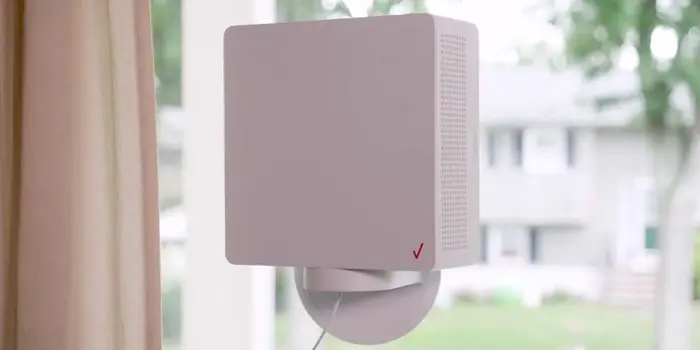
1. Select the Best Spot for Your Gateway
/wp:heading
wp:paragraph
Place the gateway near a window on an upper floor to receive the strongest signal from the nearest 5G tower. This positioning helps maximize the connection strength and ensures smooth internet performance.
/wp:paragraph
wp:paragraph
The signal from the 5G tower is key to delivering fast and reliable speeds, so it’s worth spending a few moments finding the most optimal location in your home.
/wp:paragraph
wp:paragraph
Avoid placing the gateway in a basement or an area with thick walls, as these can weaken the signal.
/wp:paragraph
wp:heading {“level”:4}
2. Power Up the Gateway
/wp:heading
wp:paragraph
Connect the gateway to a power outlet. The light indicator will show:
/wp:paragraph
wp:list
- wp:list-item
- Flashing white: Booting up
/wp:list-item
/wp:list
wp:paragraph
/wp:paragraph
wp:list
- wp:list-item
- Red and white blinking: Installing updates (approximately 5 minutes)
/wp:list-item
/wp:list
wp:paragraph
/wp:paragraph
wp:list
- wp:list-item
- Solid white: Ready for use
/wp:list-item
/wp:list
wp:paragraph
/wp:paragraph
wp:list
- wp:list-item
- Solid red: Poor signal; move to a better location.
/wp:list-item
/wp:list
wp:paragraph
Once the gateway has powered up and completed any updates, it’s ready to connect to your devices. This step is crucial to ensure the latest firmware is installed, which enhances performance and security.
/wp:paragraph
wp:heading {“level”:4}
3. Use the My Verizon App
/wp:heading
wp:list
- wp:list-item
- Scan the QR code in the provided quick start guide to download the app.
/wp:list-item
/wp:list
wp:paragraph
/wp:paragraph
wp:list
- wp:list-item
- Sign in to your account (or set up one if needed).
/wp:list-item
/wp:list
wp:paragraph
/wp:paragraph
wp:list
- wp:list-item
- Follow the app’s step-by-step guide to complete the setup.
/wp:list-item
/wp:list
wp:paragraph
The My Verizon app is your primary tool for managing the setup process. It guides you through connecting the gateway and assists in troubleshooting should any issues arise.
/wp:paragraph
wp:paragraph
The app provides easy access to customer support and advanced settings for tech-savvy users.
/wp:paragraph
wp:paragraph
The app’s 5G signal tool will help you reposition the gateway if the light remains red. By following the app’s recommendations, you can ensure the most substantial possible connection.
/wp:paragraph
wp:heading {“level”:4}
4. Check Your Connection
/wp:heading
wp:paragraph
Run a speed test to confirm the connection’s performance. Testing your internet speed ensures that your Verizon 5G Home Internet performs as expected.
/wp:paragraph
wp:paragraph
If speeds are lower than anticipated, you may need to reposition the gateway or troubleshoot further.
/wp:paragraph
wp:heading
Troubleshooting Common Issues
/wp:heading
wp:paragraph
If you encounter problems:
/wp:paragraph
wp:list
- wp:list-item
- Allow the gateway enough time to update and connect.
/wp:list-item
/wp:list
wp:paragraph
/wp:paragraph
wp:list
- wp:list-item
- Use the app’s 5G signal feature to locate the best placement.
/wp:list-item
/wp:list
wp:paragraph
/wp:paragraph
wp:list
- wp:list-item
- Restart the device by unplugging it for 30 seconds, then reconnecting.
/wp:list-item
/wp:list
wp:paragraph
/wp:paragraph
wp:list
- wp:list-item
- Contact Verizon support via the app’s chat icon for further help.
/wp:list-item
/wp:list
wp:paragraph
Issues during setup are rare, but they can happen. Often, a simple restart or repositioning the gateway will resolve connectivity problems. If additional support is needed, Verizon’s customer service is readily available.
/wp:paragraph
wp:heading
What to Do If the Internet Is Slow?
/wp:heading
wp:image {“id”:958,”width”:”560px”,”height”:”auto”,”sizeSlug”:”full”,”linkDestination”:”none”,”align”:”center”}

/wp:image
wp:paragraph
If your internet speed is less than expected, consider:
/wp:paragraph
wp:list
- wp:list-item
- Optimizing your Wi-Fi network placement.
/wp:list-item
/wp:list
wp:paragraph
/wp:paragraph
wp:list
- wp:list-item
- Following are the guides to boost Wi-Fi range and performance.
/wp:list-item
/wp:list
wp:paragraph
/wp:paragraph
wp:list
- wp:list-item
- Checking for device-specific issues or obstacles affecting signal strength.
/wp:list-item
/wp:list
wp:paragraph
Obstructions like walls, furniture, or large appliances can interfere with Wi-Fi signals. Moving the gateway to a more central and elevated position in your home can improve coverage.
/wp:paragraph
wp:paragraph
Additionally, outdated devices or network congestion may also affect speeds.
/wp:paragraph
wp:heading
Why Choose Verizon 5G Home Internet?
/wp:heading
wp:paragraph
Verizon’s 5G internet is an excellent choice for most homes. The self-installation is simple, and the plans provide:
/wp:paragraph
wp:list
- wp:list-item
- High speeds (up to 1,000Mbps on the Plus plan)
/wp:list-item
/wp:list
wp:paragraph
/wp:paragraph
wp:list
- wp:list-item
- No need for professional installation
/wp:list-item
/wp:list
wp:paragraph
/wp:paragraph
wp:list
- wp:list-item
- Generous perks like unlimited data and no contracts
/wp:list-item
/wp:list
wp:paragraph
Wireless technology offers the flexibility to install and relocate the gateway without requiring rewiring.
/wp:paragraph
wp:paragraph
While it may not always match the consistency of fiber or cable, most users will find the service reliable for streaming, gaming, and working from home.
/wp:paragraph
wp:paragraph
Verizon’s pricing and perks make it a strong contender in the home internet market. The absence of contracts and data caps ensures users can adapt their plans as needed.
/wp:paragraph
wp:heading
Frequently Asked Questions
/wp:heading
wp:paragraph
Can you install Verizon 5G Home Internet on your own?
/wp:paragraph
wp:paragraph
Yes, the process is simple and requires no technical expertise. Use the My Verizon app for guided instructions and support.
/wp:paragraph
wp:paragraph
Is there a cost for setting up Verizon 5G Home Internet?
/wp:paragraph
wp:paragraph
No, the self-installation kit is provided free of charge.
/wp:paragraph
wp:paragraph
What speeds does Verizon 5G Home Internet offer?
/wp:paragraph
wp:paragraph
Speeds range from up to 300Mbps with the standard plan to up to 1,000Mbps with the Plus plan.
/wp:paragraph
wp:paragraph
With its quick setup and impressive perks, Verizon 5G Home Internet is a smart choice for anyone seeking an easy and reliable internet service. Whether streaming movies, video conferencing, or gaming, this service offers the performance and convenience you need.
/wp:paragraph